
Blog
Structured Cabling in Coimbatore (2026): New Office IT Checklist, Cost per Point and Cat6 vs Cat6A

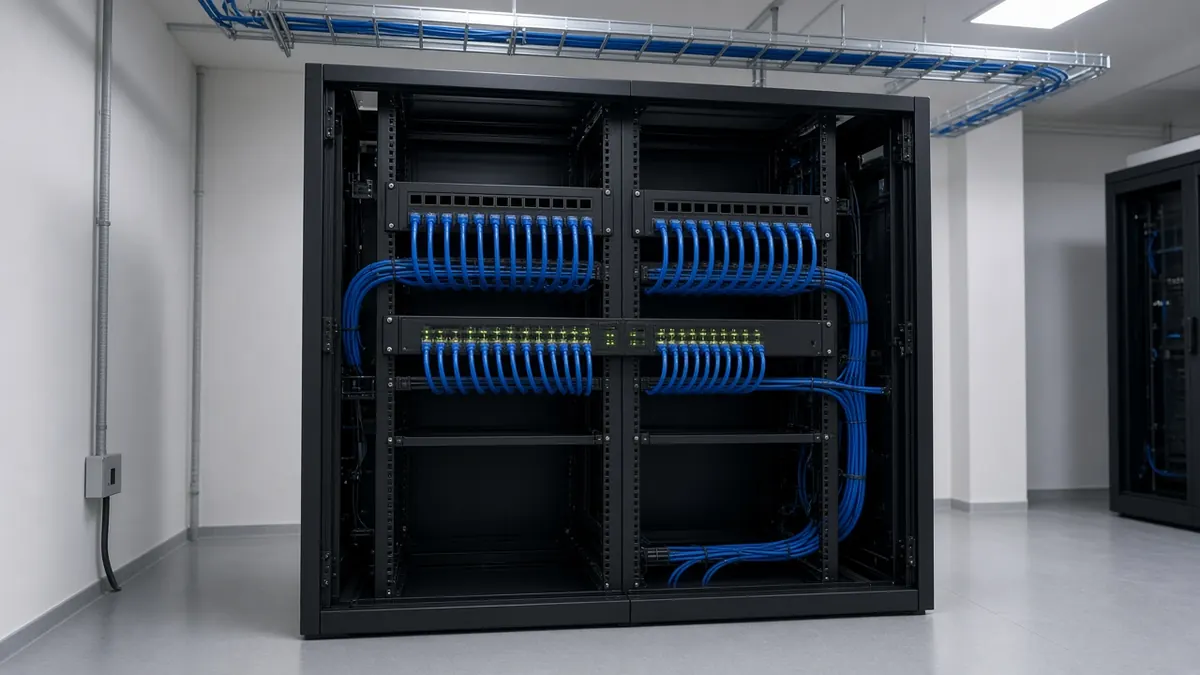
Quick answer: Structured cabling is an organised network of cables, patch panels and racks that connects every desk, access point, camera and device in an office to a central point, following recognised standards. For a new office, plan it before the false ceiling and partitions go up. Fix the number of data points per desk, the access-point and camera locations, the rack position, power and UPS, and the ISP entry route. Typical 2026 Indian market rates are about ₹1,000–₹2,500 per installed Cat6 point and ₹2,500–₹4,500 per Cat6A point. When you shortlist companies for structured cabling in Coimbatore, ask for a point-wise layout, the cable category, test reports and labelling as part of the quote.
Whether you are moving into a floor in Saravanampatti’s IT corridor or fitting out a smaller office in Peelamedu, the network is the one system everyone notices only when it fails. Sysadmins setting up a new office ask the same questions again and again: “Building my first new office… what should I keep in mind?” and “What should I look for when touring commercial rental properties?” This checklist brings those answers together for Coimbatore offices.
What is structured cabling, and why is it important?
Structured cabling is a planned cabling system rather than cables run as and when needed. It typically includes:
- Horizontal cabling from each outlet (desk, access point, camera, printer) back to a rack
- Patch panels and a network rack where every cable ends neatly and is labelled
- Backbone cabling between floors or racks, often fibre
- Patch cords, cable trays and conduits for clean routing
It matters because it makes moves, additions and changes simple. Faults are easy to trace, and the network can be upgraded without rewiring the office. Ad hoc cabling works on day one and becomes a tangle by year two.
The building blocks of a structured cabling system
| Subsystem | What it covers |
|---|---|
| Entrance facility | Where the ISP and building services enter |
| Equipment or rack room | Core switches, firewall, servers and UPS |
| Backbone | Links between racks and floors, often fibre |
| Telecom room or floor rack | Patch panels and access switches for each floor |
| Horizontal cabling | Runs from the rack to each outlet |
| Work area | Outlets, faceplates and patch cords at desks and devices |
Step 1: Before you sign the lease
Ask the landlord or building management:
- Where does the ISP fibre enter the building, and can more than one ISP reach your floor?
- Is there a riser or shaft you can use between floors?
- What power backup is available (DG, UPS), and which circuits does it cover?
- Can you install a rack in a ventilated room or cabinet?
- Are there restrictions on drilling, false ceilings or rooftop equipment?
ISP lead times are one of the most common surprises in office moves, so start that conversation early.
Step 2: Plan points, not just cables
Make a point schedule room by room:
| Location | What to plan |
|---|---|
| Workstations | Data points per desk, including spares for growth |
| Meeting rooms | Points for the display, video conferencing and the table |
| Ceiling | Access points, cameras and sensors |
| Reception and entry | Access control, video door phone, visitor screen |
| Printers and IoT | Dedicated points |
| Rack room | Space, ventilation, power, earthing |
Add spare points now. They are much cheaper during fit-out than after the ceiling is closed.
Step 3: Cat6 vs Cat6A
“Cat6 vs Cat6A” is a common question. Under the TIA cabling standards, Cat6A is specified for 10-gigabit Ethernet (10GBASE-T) over a full 100 m channel, while Cat6 supports 10-gigabit only over shorter runs (up to 55 m). Both handle gigabit Ethernet comfortably.
- Cat6 suits most small and mid-sized offices today.
- Cat6A is worth considering for long runs, high-density Wi-Fi access points, or if you want headroom for faster networks in future. It is thicker and needs more space in trays and conduits.
Ask for every link to be tested and the reports handed over, whichever category you choose. Many offices use a mix: Cat6 to desks, and Cat6A or fibre to access points, between racks and between floors, where traffic is aggregated.
PVC or LSZH cable jacket?
Standard cable jackets are PVC. LSZH (low smoke, zero halogen) jackets give off less smoke and no halogen gases in a fire, so they are often specified for enclosed offices, ceilings and risers, or where the landlord or client requires it. Confirm which jacket is quoted.
Step 4: Wi-Fi design: how many access points do you need?
There is no fixed number per sq ft. It depends on the number of users and devices, wall materials, the floor layout and the applications in use (video calls need more capacity than email). A practical approach:
- Design for capacity (how many people are in each zone), not just coverage.
- Use ceiling-mounted access points connected by cable, powered by PoE switches.
- Separate staff, guest and IoT networks.
- Do a site survey after the partitions are up and adjust placement.
Why is my office Wi-Fi not working?
Common causes include too few access points, a consumer router doing an office’s job, access points hidden above metal ceilings, channel interference from neighbouring offices, and no cabled backhaul. Most of these are design problems, not internet problems.
Is a LAN cable faster than Wi-Fi?
A wired connection is generally more stable and has lower latency than Wi-Fi, especially in busy offices. Fixed desks, video-conferencing rooms and servers benefit from cable. Laptops and phones use Wi-Fi.
Step 5: Rack, power and cooling
- A network rack with patch panels, switches, a firewall and cable managers
- UPS sized for the network equipment, with enough runtime for your needs
- Ventilation or cooling. Small rack rooms get hot quickly in Coimbatore summers.
- Earthing and surge protection
- Labelling of every port and cable, with a simple diagram handed over at the end
The active layer (switches, firewall, NAS, UPS and remote access) is covered under our IT infrastructure services.
Step 6: Firewall and security basics for a small office
“Best firewall for small office” is a common search. The right choice depends on users, internet links and what you need to control. At minimum, a small office should have:
- A business-grade firewall or router with regular firmware updates
- Separate networks for staff, guests and devices such as cameras
- Secure remote access (VPN) instead of open ports
- Admin passwords changed from defaults, with access documented
Step 7: Cameras and access control
Plan camera positions, the NVR location and access-control points with the network, because they share cabling, PoE switches and rack space. See our CCTV and access control services.
Structured cabling cost per point (2026)
People often search for “LAN cable laying cost per metre”, but most office quotes are built per point (outlet), plus the rack, patch panels, switches and labour. The per-point price depends on the cable category, the average run length, the routing method (tray, conduit or ceiling) and whether testing is included.
| Item | Typical 2026 Indian market range |
|---|---|
| Cat6 point, installed, terminated and tested | About ₹1,000–₹2,500 |
| Cat6A point, installed, terminated and tested | About ₹2,500–₹4,500 |
| Cable only | About ₹30–₹55 per metre, depending on category and brand |
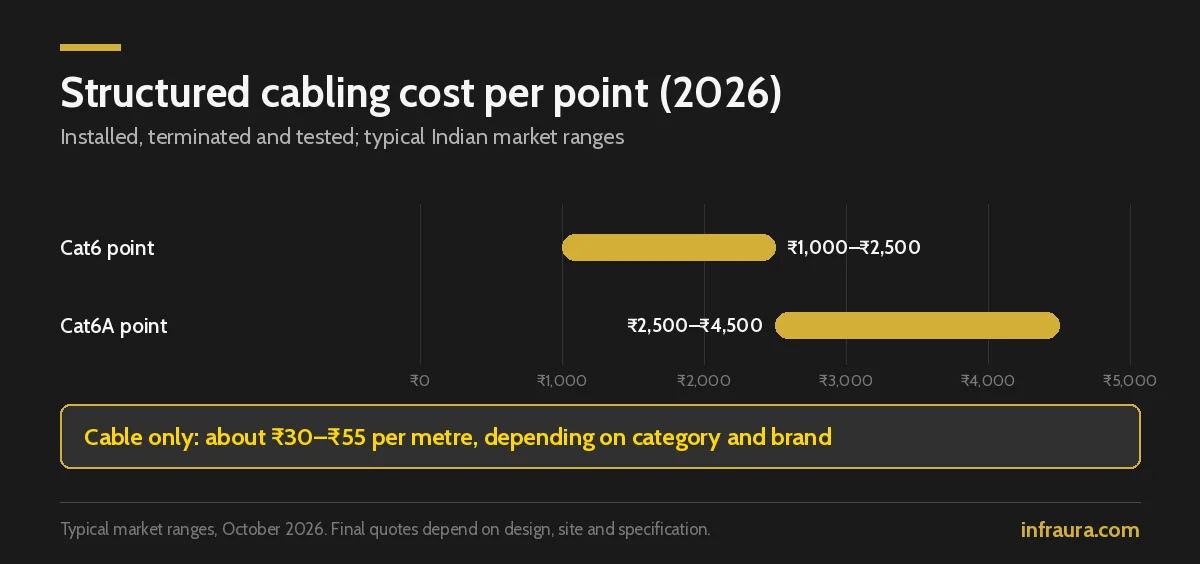
These are typical Indian market ranges, not Infraura’s quote. Actual quotes depend on design, site and specifications, and Infraura will confirm after a site visit. Retrofit work through finished ceilings and walls costs more; large open floors with short parallel runs cost less.
What a per-point price should include
| Component | Check |
|---|---|
| Cable run from rack to outlet | Category, brand and jacket (PVC or LSZH) |
| Keystone jack and faceplate | Same category as the cable |
| Patch panel port | Same category; labelled |
| Patch cords at both ends | Included or extra? |
| Containment | Tray, conduit or ceiling routing |
| Termination, labelling and testing | Test report for every link |
Worked example: a 30-seat office
| Points | Count |
|---|---|
| Desks (one per seat) | 30 |
| Spare desk points for growth | 6 |
| Meeting rooms (display, VC, table) | 6 |
| Wi-Fi access points | 4 |
| Cameras | 6 |
| Printers | 2 |
| Reception and access control | 2 |
| Total | 56 points |
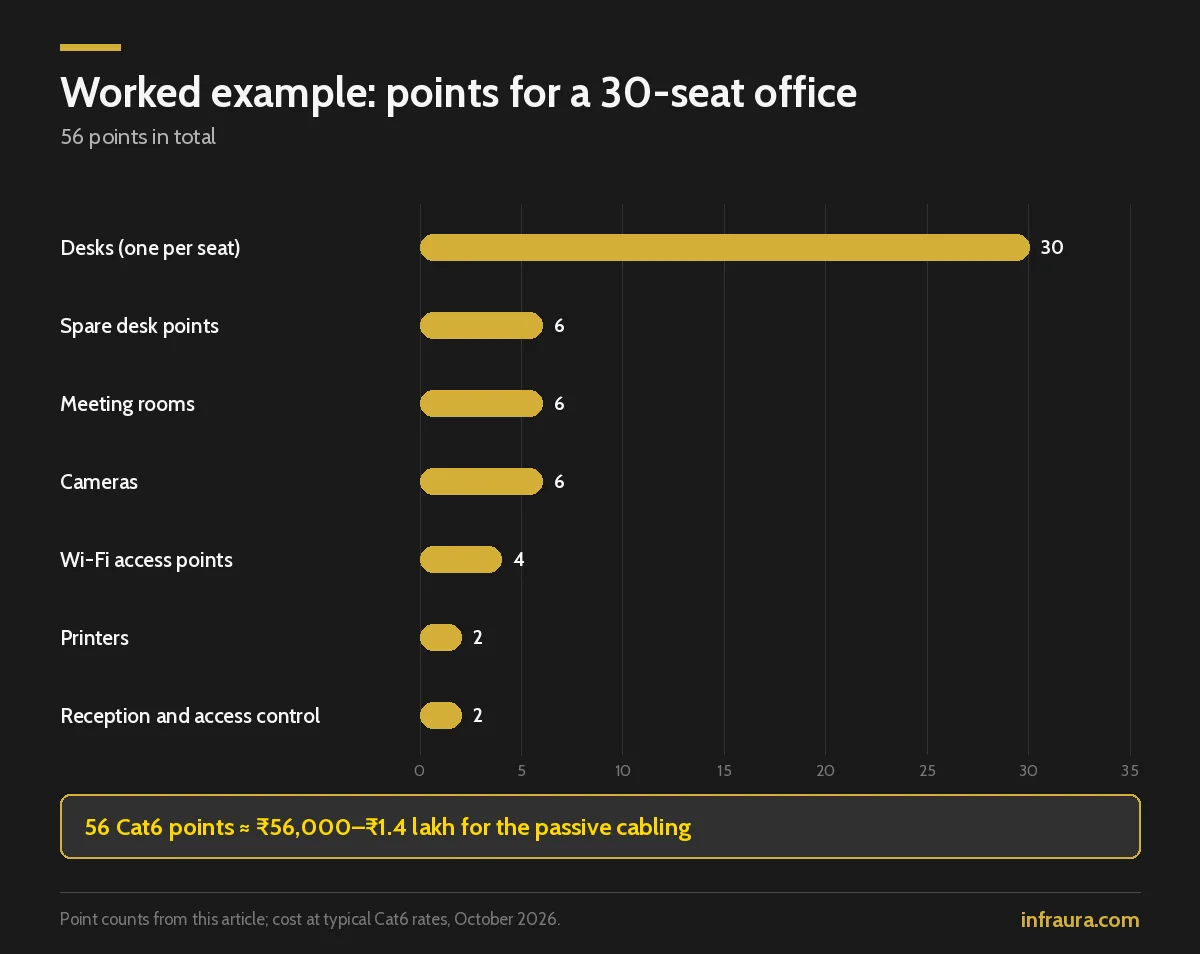
At typical Cat6 rates, 56 points work out to roughly ₹56,000–₹1.4 lakh for the passive cabling. Upgrading the four access-point runs to Cat6A adds a modest amount.
The full network budget
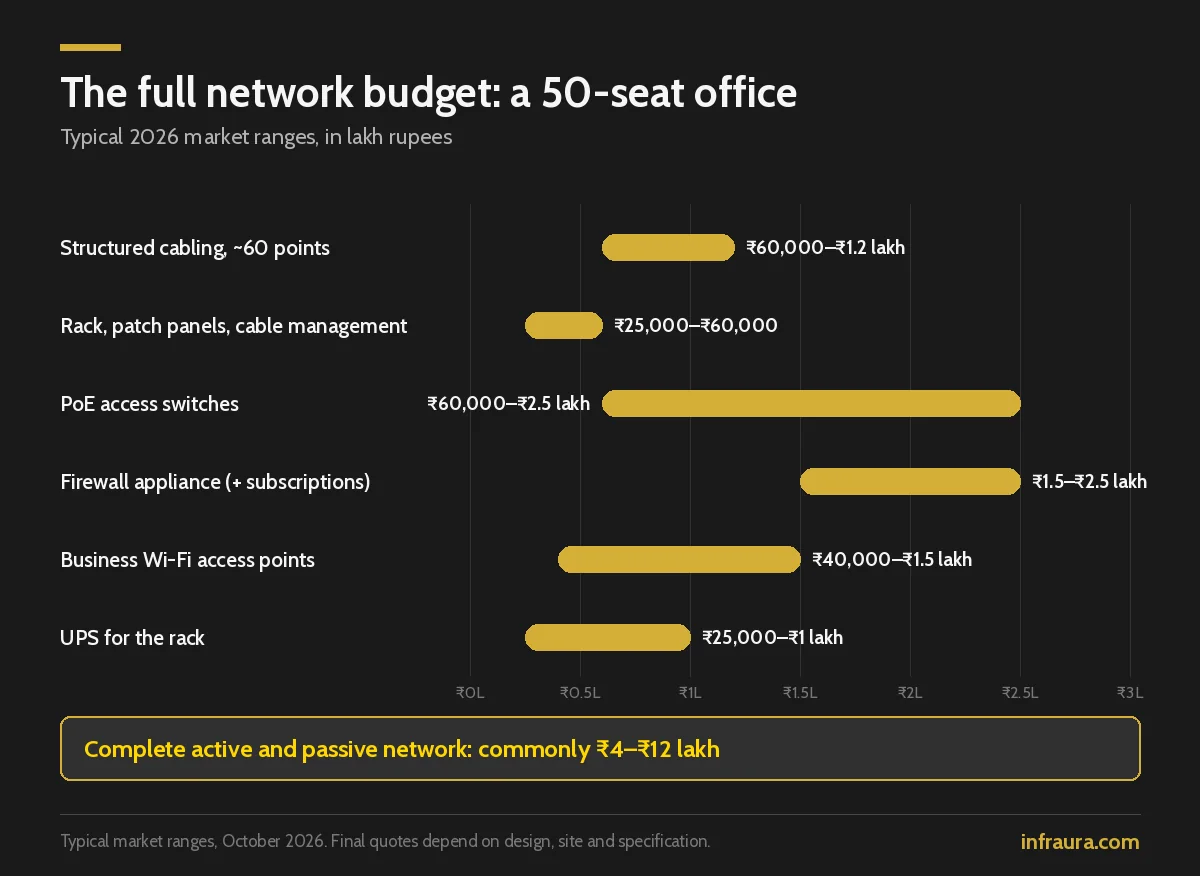
Cabling is only part of the bill. For a typical 50-seat office, typical 2026 market ranges look like this:
| Item | Typical range |
|---|---|
| Structured cabling, about 60 points | ₹60,000–₹1.2 lakh |
| Rack, patch panels and cable management | ₹25,000–₹60,000 |
| PoE access switches | ₹60,000–₹2.5 lakh |
| Firewall appliance | ₹1.5–₹2.5 lakh, plus annual subscriptions |
| Business Wi-Fi access points | ₹40,000–₹1.5 lakh |
| UPS for the rack | ₹25,000–₹1 lakh |
| Complete active and passive network | Commonly ₹4–₹12 lakh |
How to compare two cabling quotes fairly
- Same point count and the same point schedule
- Same cable category, brand and jacket
- Same containment method
- Testing and test reports included in both
- Patch cords, labelling and the as-built drawing included in both
- Warranty terms stated
Shortcuts cheap quotes take
- Copper-clad aluminium cable instead of solid copper
- Mixing categories (Cat6 cable on Cat5e jacks)
- No testing, or testing only a sample of links
- No labelling or as-built documentation
- Network cables run alongside power cables without separation
What you should receive at handover
- Test report for every link
- Labelled patch panels and outlets
- An as-built drawing with the point schedule
- Rack layout and switch port map
- Warranty documents
Office move checklist (quick version)
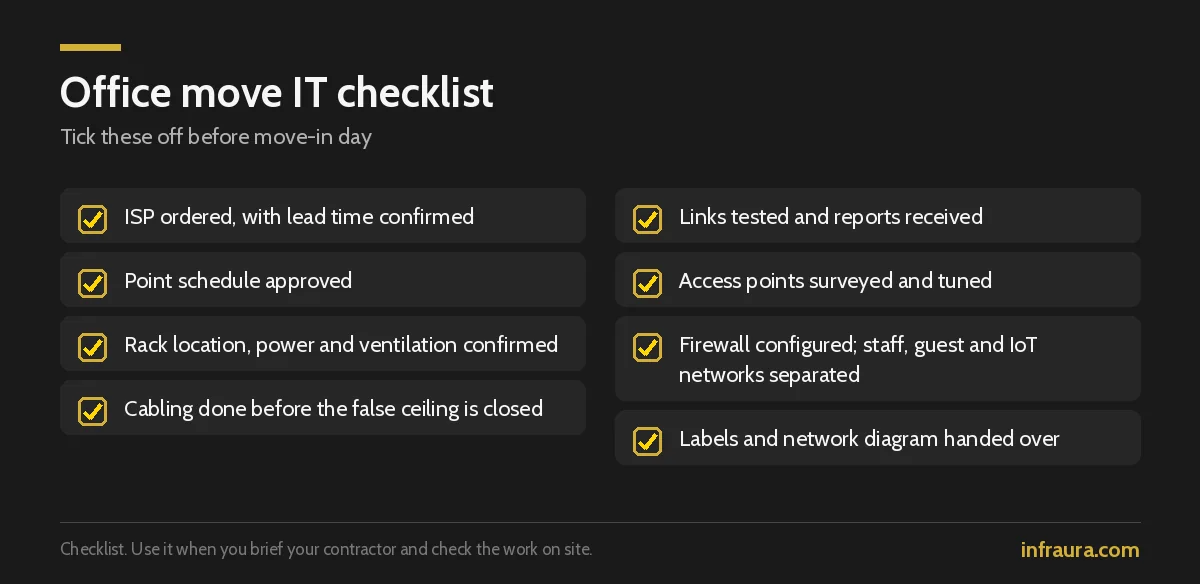
- [ ] ISP ordered, with lead time confirmed
- [ ] Point schedule approved
- [ ] Rack location, power and ventilation confirmed
- [ ] Cabling done before the false ceiling is closed
- [ ] Links tested and reports received
- [ ] Access points surveyed and tuned
- [ ] Firewall configured; staff, guest and IoT networks separated
- [ ] Labels and network diagram handed over
Structured cabling in Coimbatore: local factors to plan for
- Power quality. Put the rack on a UPS with surge protection; power dips and storms are a real risk for network equipment.
- Heat. Small rack rooms get hot in Coimbatore summers, so plan ventilation or cooling.
- ISP choice. In IT parks and commercial buildings around Saravanampatti, Peelamedu and Avinashi Road, ask which ISPs already reach the building and plan a second link for failover.
- Fit-out timing. Cabling must go in before the false ceiling and partitions close, so coordinate it with the office interior fit-out programme.
How Infraura handles structured cabling
Infraura starts with a site survey and a point-wise layout, agrees the cable category and containment, installs and terminates to standard, tests every link and hands over labelled panels, test reports and an as-built drawing. Switches, firewall and UPS are covered under IT infrastructure services, and cameras and access control share the same plan.
Frequently asked questions
What is structured cabling?
It is an organised, standards-based cabling system that connects every outlet in an office to patch panels in a central rack, so the network is easy to manage, troubleshoot and upgrade.
Why is structured cabling important?
It makes moves and changes simple, speeds up fault-finding and supports future upgrades without rewiring. Ad hoc cabling quickly becomes unmanageable.
What is the structured cabling cost per point?
Typical 2026 Indian market rates are about ₹1,000–₹2,500 per installed Cat6 point and ₹2,500–₹4,500 per Cat6A point, including cable, jack, faceplate, patch panel port, termination and testing. Long runs and retrofits cost more.
How much does Cat6A cost compared with Cat6?
Cat6A cable costs more per metre and needs matching jacks and panels, so a Cat6A point typically costs noticeably more. Labour is similar. Many offices use Cat6 to desks and Cat6A only where it matters.
Cat6 vs Cat6A: which should I install?
Cat6 suits most small and mid-sized offices. Cat6A is specified for 10-gigabit over a full 100 m channel, so it is better for long runs, dense Wi-Fi or future headroom.
How many access points do I need for my office?
It depends on users, devices, walls and layout. Design for capacity in each zone, use ceiling-mounted access points on cabled PoE, and verify with a site survey.
Is a LAN cable faster than Wi-Fi?
A wired connection is generally more stable and has lower latency, especially in busy offices. Use cable for fixed desks, meeting rooms and servers.
Why is my office Wi-Fi not working?
Usually because of too few access points, consumer-grade equipment, poor placement, interference or no cabled backhaul. A proper Wi-Fi design fixes most of these.
Should my electrician do the network cabling?
It is better handled by a network cabling specialist who terminates to standard, tests every link and keeps data cables separated from power. An electrician can lay the containment if it is planned together.
What is the best firewall for a small office?
Choose a business-grade firewall that suits your user count and internet links, keep it updated, separate staff, guest and IoT networks, and use VPN for remote access.
Setting up an office in Coimbatore?
Infraura can survey your space, prepare a point-wise cabling layout and coordinate it with your fit-out so that nothing is left exposed. Explore our networking and structured cabling in Coimbatore, or contact us to arrange a site visit.
Market basis: rates are typical Indian market ranges based on Infraura’s review of local and national pricing, October 2026. Cat6/Cat6A performance figures follow TIA cabling standards. Final quotes depend on design, site and specification.