
Blog
Smart Home Automation in Coimbatore (2026): Costs, Pre-Wiring Checklist and What to Plan Before Plastering

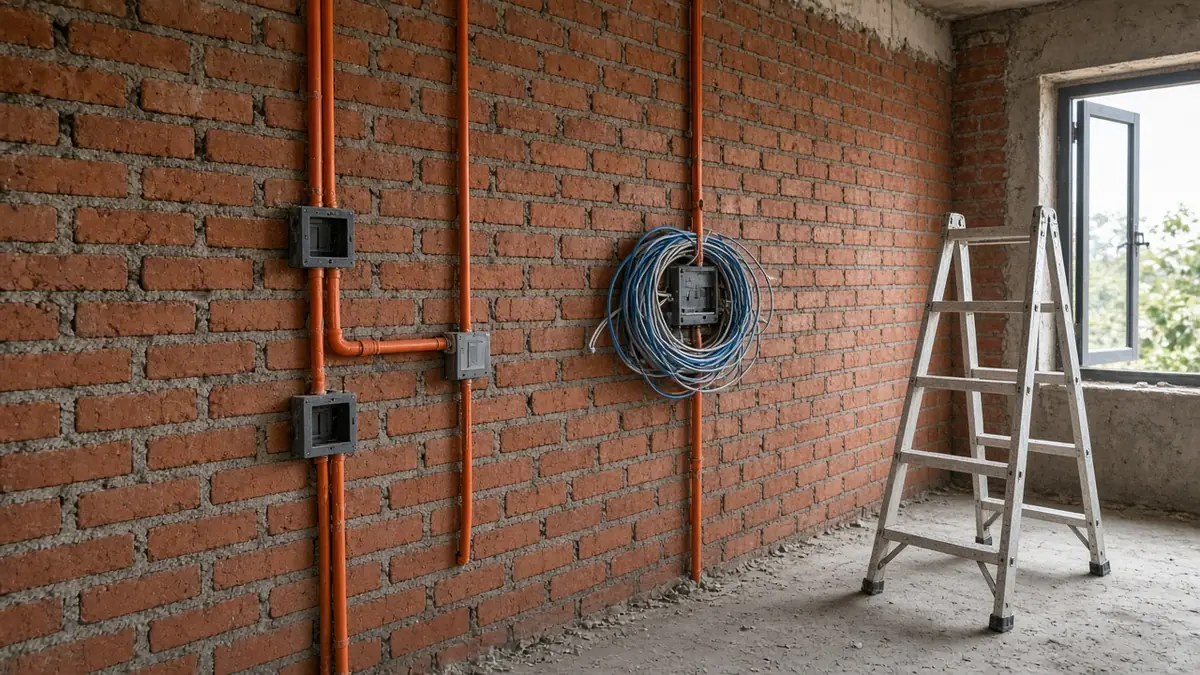
Quick answer: Plan home automation in Coimbatore homes before plastering, while walls are still open. That is when you lay conduits and neutral wires, choose deeper switch boxes, decide between wired (such as KNX) and wireless (such as Zigbee or Wi-Fi) systems, and run network cable for access points, cameras and door phones. Retrofitting later is possible but usually means visible wiring, compromises or broken plaster. Typical 2026 budgets run from about ₹1.5–₹3 lakh for a 2/3BHK apartment to ₹3.5–₹6.5 lakh for a large independent home, and basic pre-wiring alone costs far less. When you compare home automation companies in Coimbatore, ask how they will coordinate with your electrician and builder, not just which app they use.
“Home automation companies in Coimbatore” is one of the strongest local searches we found for smart homes. Many people searching are already building, and online smart-home communities are full of the same question: “New home build: where do I start and what do I plan ahead?” The honest answer is that most of the important decisions are about wiring, not gadgets.
What is a home automation system?
A home automation system lets you control and automate lighting, fans, air-conditioning, curtains, security, gates and appliances from switches, a phone app, voice assistants or schedules. It typically has four parts:
- Devices: smart switches, relays, dimmers, curtain motors, sensors, locks and cameras.
- A communication layer: wired (for example KNX or RS-485) or wireless (Zigbee, Wi-Fi, Thread or Bluetooth).
- A controller or hub that runs scenes and automations.
- Interfaces: keypads, touch panels, apps and voice control.
Why planning during construction matters
Once walls are plastered and painted, every change involves chasing walls or running surface conduit. During construction you can:
- Run a neutral wire to every switch box. Many smart switches need one.
- Use deeper or larger switch boxes to fit smart modules.
- Lay spare conduits to key points: curtain pockets, the main door, the gate, the terrace and the ceilings for sensors.
- Run network cable to access-point locations, camera positions, the TV wall and the home office.
- Plan a central cabinet for the router, network switch, NVR and automation controller, with ventilation and a power backup point.
- Group circuits sensibly so that lighting scenes are easy to programme later.
Put these into the electrical drawings and the BOQ so that everyone on site works from the same plan. If Infraura is handling your home construction, the automation layout is reviewed alongside the electrical drawings before first-fix wiring starts.
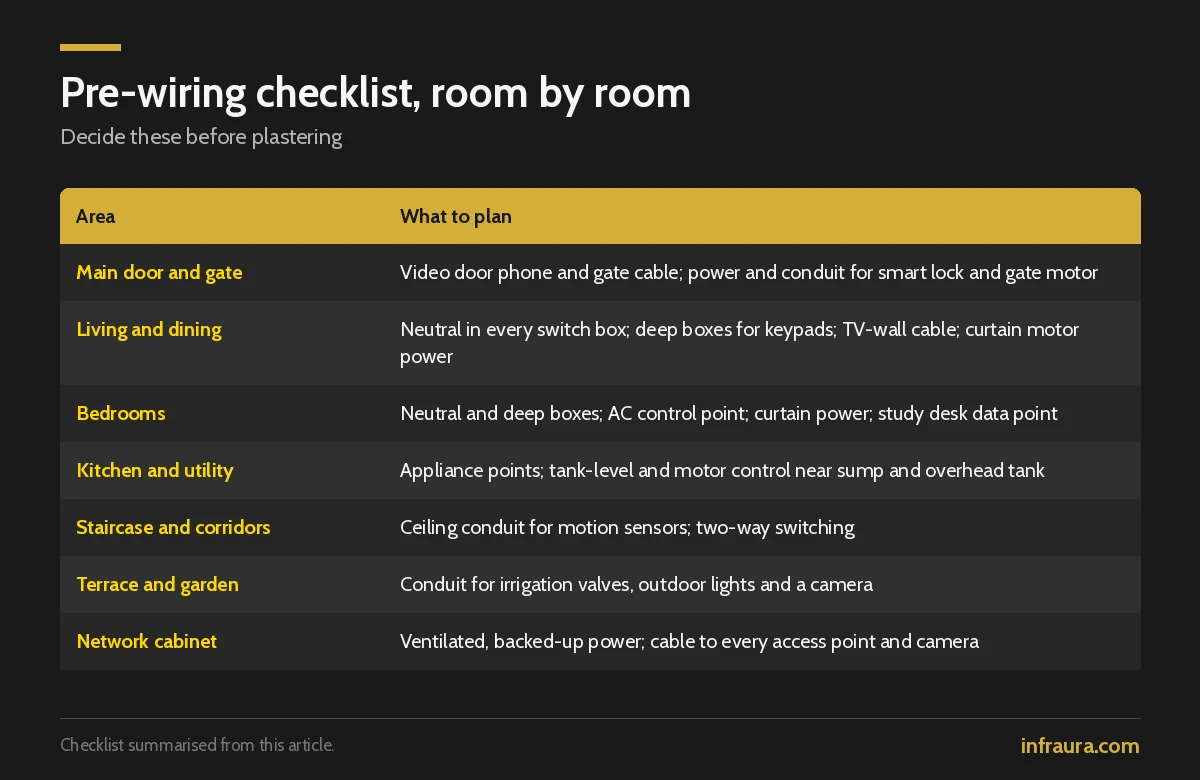
Pre-wiring checklist, room by room
| Area | What to plan before plastering |
|---|---|
| Main door and gate | Cable to the video door phone and gate; power and conduit for a smart lock and gate motor |
| Living and dining | Neutral in every switch box; deeper boxes for scene keypads; cable to the TV wall; curtain motor power at pelmets |
| Bedrooms | Neutral and deep boxes; AC control point; curtain motor power on large windows; a data point at the study desk |
| Kitchen and utility | Points for appliances you may automate; a tank-level and motor control point near the sump and overhead tank |
| Staircase and corridors | Ceiling conduit for motion sensors; two-way switching planned with automation in mind |
| Terrace and garden | Conduit for irrigation valves, outdoor lights and a camera |
| Network cabinet | Ventilated space with power backup for router, switch, NVR and controller; cable to every access point and camera |
Cables and conduits to specify
- Network cable (Cat6 or Cat6A) to access points, cameras, TV walls and desks
- A dedicated control bus cable (for example KNX) if you choose a wired system
- Power feeds to curtain motor positions and the gate motor
- Spare conduits from the network cabinet to each floor and to the terrace
- Speaker wire or empty conduit if you want in-ceiling audio later
Wired vs wireless: KNX vs Zigbee and others
“KNX vs Zigbee” is a common question from people building villas.
| Wired (e.g. KNX) | Wireless (e.g. Zigbee / Wi-Fi) | |
|---|---|---|
| Best time to install | During construction | During construction or as a retrofit |
| Reliability | Very stable; no radio interference | Depends on the mesh, the router and the device count |
| Upfront cost | Higher | Lower to start |
| Flexibility later | Very flexible through reprogramming | Easy to add devices |
| Typical fit | Large villas, long-term homes | Apartments, phased upgrades, smaller budgets |
Many homes combine both: wired control for core lighting and climate, and wireless devices for add-ons such as plug points and sensors. Which home automation system is best in India depends on your home size, budget, and how much you want to rely on internet cloud services versus local control.
What to automate first
Start with what you will use every day:
- Lighting scenes: “Good morning”, “Movie” and “All off” at the main door.
- Climate: AC scheduling and control from your phone, useful for Coimbatore’s warm afternoons.
- Curtains and blinds: especially on west-facing glass.
- Security: smart lock for the main door, video door phone, cameras and gate automation.
- Water and utilities: motor and tank-level automation, and garden irrigation timers.
Smart lock for the main door
Choose a lock that fits your door thickness and material, offers a mechanical key or other emergency override, and runs on batteries with low-battery alerts. Plan the door preparation with your carpenter before the door is made.
Video door phone
Decide early whether you want a standalone video door phone or one that integrates with cameras and your phone. Run network or dedicated cable to the gate and the main door during construction.
Cameras and recording are a separate design job. Infraura covers them under CCTV and surveillance.
The network is the foundation
Most smart homes fail because of weak Wi-Fi, not faulty switches. Large villas with RCC walls, multiple floors and terraces usually need several access points connected by cable, not one router. Plan cable runs and access-point locations as part of structured networking and Wi-Fi for the home.
How much does home automation cost?
Cost depends on the number of rooms and circuits, the choice of wired or wireless, the brand, touch panels versus standard switch plates, and how many security devices are included. Typical 2026 Coimbatore and Tamil Nadu market ranges look like this:
| Scope | Typical 2026 range |
|---|---|
| Basic pre-wiring only (network cable to rooms, CCTV conduit, neutral wires, AC circuits) | About ₹15,000–₹35,000 |
| 2/3BHK apartment (lighting, fans, smart lock, app and voice) | About ₹1.5–₹3 lakh |
| 3BHK and villas, whole-home packages | About ₹2–₹5 lakh |
| Large independent homes (full lighting, security, multiple entrances) | About ₹3.5–₹6.5 lakh |
| New villa on a wired KNX system | About ₹4–₹12 lakh |
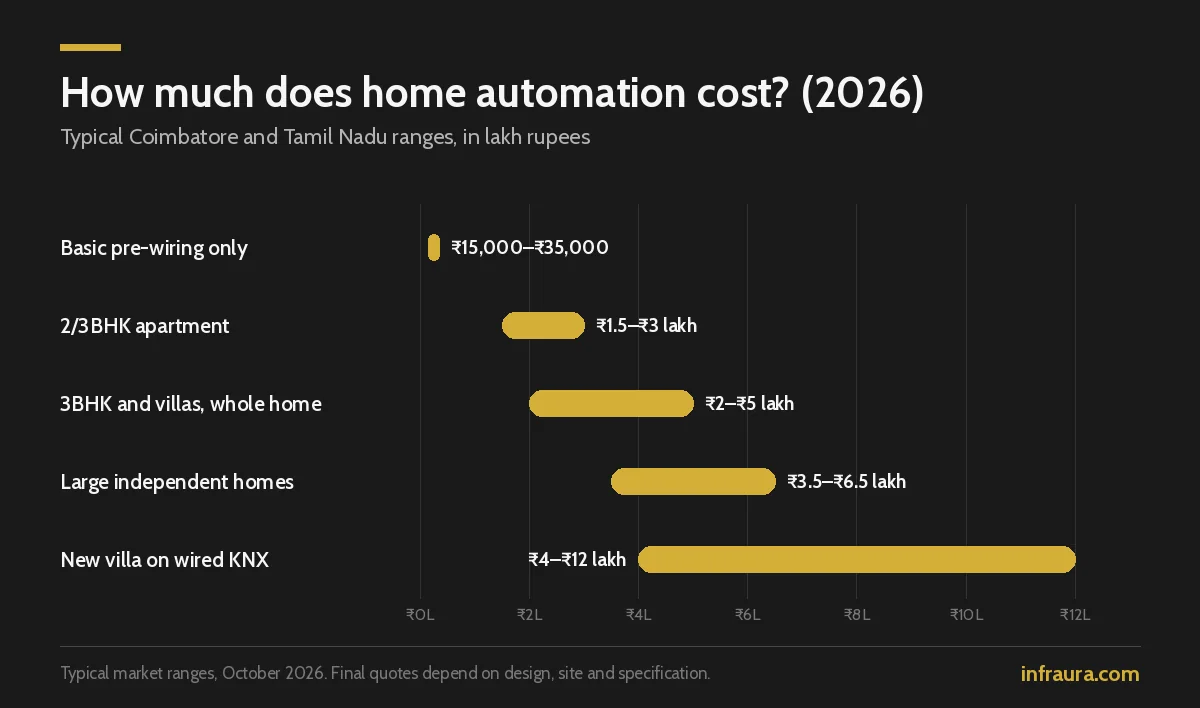
These are typical Coimbatore and Tamil Nadu market ranges, not Infraura’s fixed quote. Actual quotes depend on design, site and specifications, and Infraura will confirm after a site visit.
A useful way to control cost is to pre-wire fully during construction and automate in phases. The wiring is the hard part to add later. Devices can be added when you are ready.
Worked example: a phased plan for a new 3BHK villa
| Phase | When | What it covers |
|---|---|---|
| 1. Pre-wiring | During construction, before plastering | Neutrals, deep boxes, network cable, conduits, curtain and gate power, network cabinet |
| 2. Core automation | At handover | Lighting scenes in living areas, smart lock, video door phone, AC control |
| 3. Comfort and security | Within the next year or two | Curtains, sensors, gate automation, cameras, water automation |
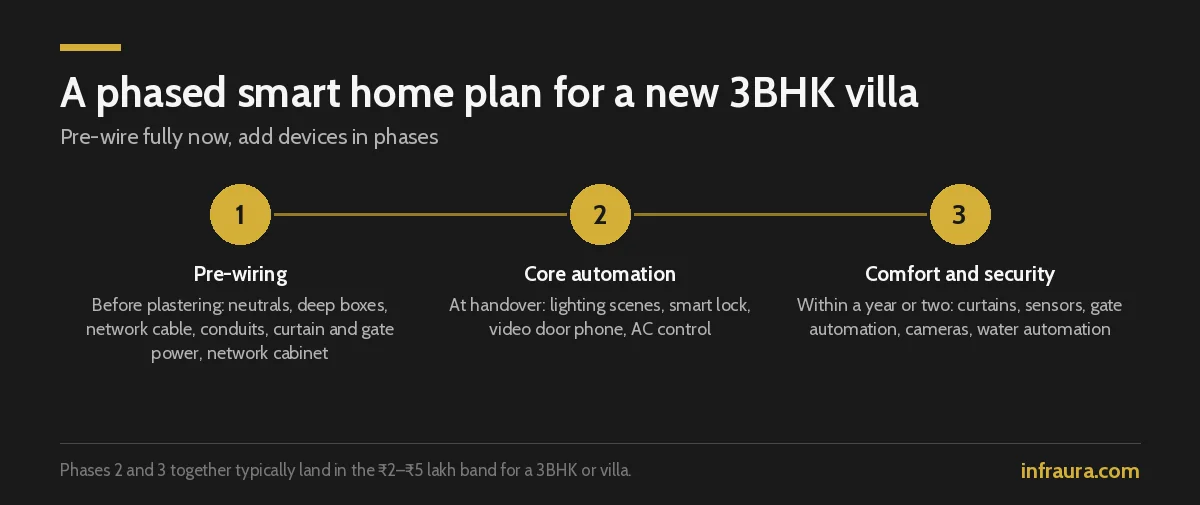
Phase 1 sits at the low end of the table above; phases 2 and 3 together typically land in the ₹2–₹5 lakh band for a 3BHK or villa, depending on brands and device count.
Pre-wiring vs retrofit
| Pre-wired during construction | Retrofit after finishing | |
|---|---|---|
| Wall chasing and repainting | Not needed | Often needed, or surface conduit |
| Wired systems such as KNX | Practical | Difficult |
| Choice of brands later | Wide | Narrower, mostly wireless |
| Finish quality | Concealed and neat | Compromises are common |
Home automation in Coimbatore: local factors to plan for
- Power cuts and voltage dips. Put the router, network switch, automation hub and NVR on a UPS or inverter-backed circuit, and add surge protection. A smart home that drops offline every power cut is frustrating.
- Heat. AC scheduling and motorised curtains on west-facing glass make a real difference on warm afternoons. Ventilate the network cabinet.
- Monsoon months. Use weather-rated outdoor devices and protect gate and terrace wiring from water entry.
- Home type. Apartments around Saravanampatti and Peelamedu often suit wireless systems on top of basic pre-wiring. Older homes in RS Puram suit wireless retrofits that avoid breaking heritage finishes. New villas around Race Course are the best fit for wired systems planned during construction.
Mistakes to avoid
- Choosing devices before the wiring plan
- Skipping neutral wires in switch boxes
- One router for a multi-floor house
- No backup power for the hub and network
- No clarity on who programmes changes after handover
- Buying devices from several brands that don’t work together
How to choose a home automation company in Coimbatore
Ask these questions:
- Will you prepare an automation and electrical layout before plastering, and coordinate with my electrician and builder?
- Which systems and brands do you install, and why do you recommend them for my home?
- Does the system keep working without internet for core functions?
- Who does programming and changes after handover, and at what cost?
- What warranty and service support do you offer locally?
- Can I see a working installation?
People who already use smart homes in India often say after-sales support is the weak spot, so give question five real weight.
How Infraura handles smart homes
Infraura plans automation, networking and security as one system. For homes under construction, that means an automation and electrical layout before plastering, coordination with the electrician and builder, cable and access-point planning for structured networking and Wi-Fi, camera positions for CCTV and surveillance, then installation, programming, testing and a walkthrough at handover. Phased upgrades are planned so later devices fit the wiring already in the walls.
Frequently asked questions
What is a home automation system?
It lets you control and automate lighting, fans, AC, curtains, security and appliances through switches, apps, voice or schedules. It uses smart devices, a wired or wireless network and a controller.
How much does home automation cost?
Typical Coimbatore figures run from about ₹1.5–₹3 lakh for a 2/3BHK apartment to ₹3.5–₹6.5 lakh for a large independent home; wired KNX villas can cost ₹4–₹12 lakh. Pre-wiring during construction and automating in phases keeps cost manageable.
How much does smart home pre-wiring cost?
Basic pre-wiring during construction, covering network cable to rooms, CCTV conduit, neutral wires and AC circuits, typically costs about ₹15,000–₹35,000. Fuller pre-wiring for wired systems and curtains costs more but keeps every option open.
Can I add home automation after construction?
Yes, mostly with wireless devices. But concealed network cable, neat cameras, curtain motors and wired systems are far easier during construction. If you might automate within a few years, pre-wire now.
KNX vs Zigbee: which is better?
KNX is wired, very stable and suits villas planned during construction. Zigbee is wireless, cheaper to start and easier to retrofit. Many homes use a mix of both.
Which home automation system is best in India?
The best system depends on home size, budget and whether you want local control without internet. Choose an installer who will support the system locally after handover.
When should I plan home automation in a new home?
Before plastering. Neutral wires, deeper switch boxes, conduits and network cables are easy to add then and difficult afterwards.
Which smart lock is best for a main door?
Choose one that fits your door’s thickness and material, has a mechanical or emergency override, and gives low-battery alerts. Plan door preparation before the door is made.
Will my smart home work during a power cut or internet outage?
Core functions can keep working if the hub, router and switches are on backup power and the system supports local control. Ask your installer which functions need the internet and which don’t.
How do I choose the best home automation company in Coimbatore?
Ask for a pre-plaster wiring layout, brand recommendations with reasons, offline operation, local programming support, warranty terms and a working installation you can see.
Planning a smart home in Coimbatore?
If your home is under construction or still on paper, now is the right time. Infraura can review your electrical drawings and plan automation, networking and security together. See our smart home services in Coimbatore, or contact us to book a site visit.
Market basis: rates are typical Coimbatore and Tamil Nadu market ranges based on Infraura’s review of local pricing, October 2026. Final quotes depend on design, site and specification.